
“Website care” can mean very different assignments
“Please look after our website” could mean adding products, repairing a broken form or building a booking function. All three support the website, but need different skills, time and acceptance criteria.
Agreeing only a package name without defining the work can create different expectations about what is included. A business may see a small edit while the supplier needs to change underlying data, interfaces and processing flows.
The clearest approach is to distinguish each group's purpose, then confirm the scope on the actual operating website.

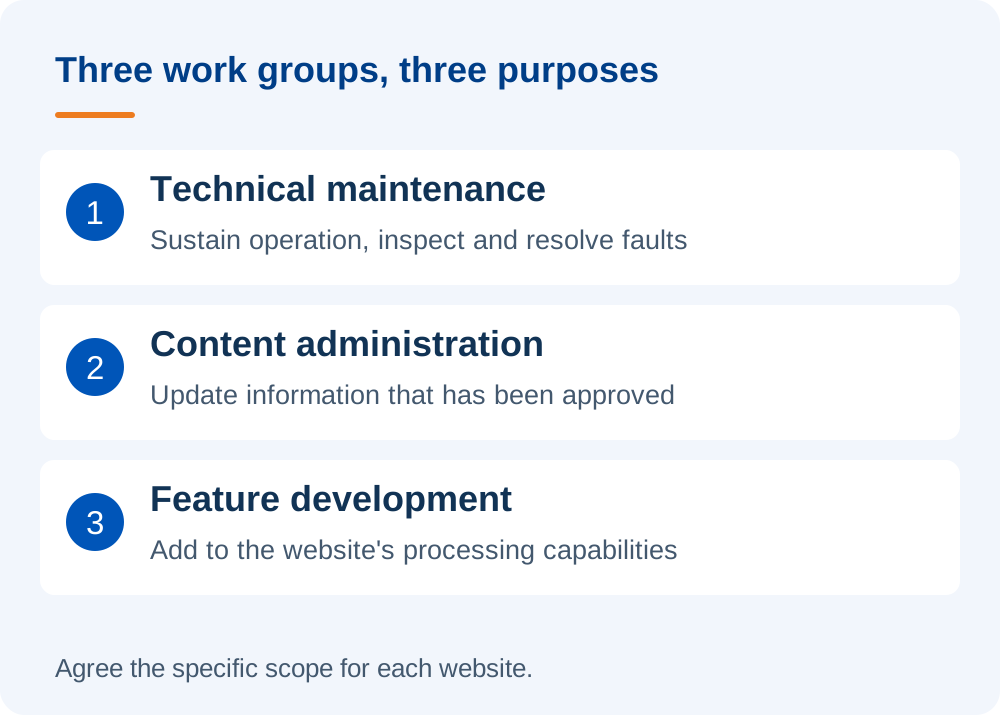
Website maintenance: sustain operation and resolve technical issues
Maintenance focuses on helping a site continue operating reliably: checking functions, controlled software updates, backups, security monitoring and resolving faults within the agreed scope.
A form that previously sent emails but no longer does is an issue to investigate. The cause may be code, email configuration, an external service or a recent change. The person handling it needs to identify the cause before deciding on a fix.
Not every technical request is automatically included in maintenance fees. Pre-existing faults, major incidents or software replacement may need separate assessment, based on the current state and specific agreement.
Content administration: keep information accurate, clear and current
Content administration includes publishing articles, updating products, replacing images, changing service information or uploading new documents. Preparing content must be distinguished from publishing it.
Uploading an approved banner differs from developing its concept, writing the message and designing it. Likewise, importing product information from a client file differs from researching and writing every product description.
Before assigning work, agree who provides materials, checks accuracy, approves and publishes. When several departments are involved, a clear approval contact helps reduce repeated revisions.
If the internal team needs to make frequent updates, CMS training may be more suitable than outsourcing every publishing request.
Feature development: change what the website can do
Feature development adds or changes processing capabilities. Examples include bookings, a dealer area, a CRM connection or a new information-approval workflow.
A button may look small, yet require data storage, permissions, notifications, input validation and error handling. The visible size of a feature is therefore not a reliable measure of complexity.
For these requests, clarify the purpose, users, data, scenarios and acceptance criteria before estimating time or cost.
Distinguish the work through common requests
The table illustrates an initial discussion. Final classification still depends on the site's condition and the agreed scope.
| Request | Typical work group | What to clarify |
|---|---|---|
| Publish an approved article | Content administration | Images, formatting, publication date and final approver. |
| Replace a banner | Content administration; possibly design | Is a suitable file ready, or is a new design needed? |
| Repair a form that will not send | Maintenance and fault resolution | Did it work before, and when did the fault start? |
| Add a form field | Depends on the extent of change | Display only, or changes to email, storage and data connections too? |
| Update WordPress or plugins | Technical maintenance | Compatibility, backups and checks after updating. |
| Add a language | Usually requires separate development assessment | Multilingual mechanism, translations, URLs and related functions. |
| Add a service page | Content or interface development | Existing layout or a new design? |
| Connect the website to a CRM | Integration development | Data exchanged, access, failures and third-party costs. |
One partner can handle all three groups
Distinguishing the work does not mean hiring three suppliers. An ongoing relationship may include technical maintenance, content updates and improvements agreed in stages.
Avoid assuming that “maintenance” always includes every request or always excludes content work. For example, DigiWeb's WordPress maintenance packages include content updates within their published scope. For a particular website, both parties still need to confirm volume, assignment arrangements and additional work.
Who does the work, who approves, and what counts as complete?
A request should have someone responsible on both the business and delivery sides. For example, the business approves specialist service information while the website team checks its display, links and related actions.
Feature acceptance should use agreed scenarios. “The booking button is there” is insufficient if visitors cannot choose a time or staff do not receive the appointment.
Timing also needs to fit business activity. Do not change a critical component during a live campaign without agreeing checks and a response plan if something fails.
How to send a request your partner can understand
You do not need technical terminology. Provide five things:
- Location: the URL or area requiring work.
- Current state: how the website currently looks or operates.
- Desired outcome: what visitors or staff should be able to do afterwards.
- Materials and approval: content, images, references and the approval contact.
- Priority: which activity is affected and any real deadline to consider.
Hypothetical example: “Service page A shows our old phone number. Please change it in the content and the mobile call button. Sales has approved the new details; please check both locations afterwards.” This is easier to deliver and accept than “please fix our information”.
Start with the work your website actually needs
For DigiWeb, a suitable proposal should start from the current state and operating objectives. You can send a list of the work your website needs to clarify together what needs regular attention, what suits internal training and what should become a separate assignment.