
An accessible website does not mean everything is working properly
Your website still opens, banners display and administrators can log in. But when a visitor submits an enquiry, does the email reach the right person? After the latest update, does product search still return the correct results? If the site fails, can the available backup actually restore it?
These are questions website maintenance needs to answer. When a website supports business operations, care must go beyond its appearance: monitoring important functions, controlling changes and knowing what to do when a problem occurs.
Your business does not need to perform every technical task itself. However, you should know what is being checked, what the results are and who is responsible for outstanding issues.

What groups of work does website maintenance include?
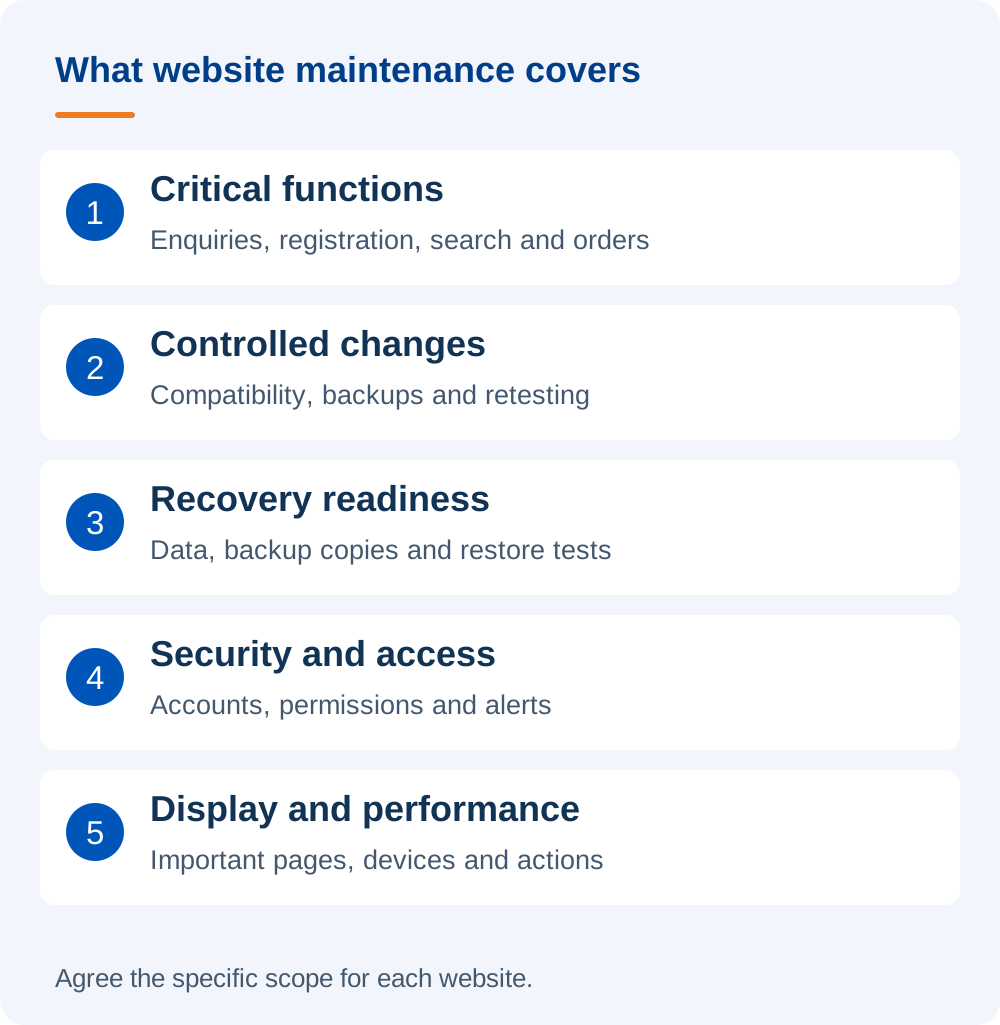
1. Check the functions customers use to interact with your business
Every website has important actions: submitting enquiries, requesting advice, finding products, downloading documents, booking or ordering. These need to be tested as complete user journeys.
For example, testing a contact form does not end with seeing a success message. Confirm that the system received the enquiry, passed it to the intended destination and included enough information for staff to respond. If the site connects to a CRM or email service, that connection is part of the flow to examine.
Payment testing needs an appropriate plan to avoid unintended real transactions. The test scope must reflect each website's functions and operating arrangements.
2. Update software and check after changes
WordPress, plugins, themes and the server environment each have their own lifecycle. Updates address issues fixed by developers, but can also affect custom code or existing connections.
The work should therefore include compatibility assessment, backups, a deployment approach and retesting relevant functions. Significant changes should have a test environment and a way to return to the previous state.
Do not judge maintenance quality solely by whether the site runs the latest version. The important question is whether changes have been made in a controlled way.
3. Backups and the ability to restore
A “backup successful” message does not fully answer whether recovery is possible. You need to know what the backup includes, where it is stored, who can access it and whether restoration has been tested under suitable conditions.
For sites with continuous orders or data updates, backup intervals should reflect how much data the business can accept losing in an incident. No single backup schedule suits every website.
4. Security and access rights
This may include reviewing administrator accounts, individual permissions, unsupported software, unusual access and relevant alerts. Access should also be reviewed when staff or suppliers change.
Malware scanning is one part of the work, not sufficient evidence that a site is free of risk. After an incident, the cause needs investigation and follow-up monitoring. See DigiWeb's scope for WordPress and PHP website security.
5. Display, performance and important information
Content that was correct when published may become outdated months later. Phone numbers, forms, service categories, downloads and advertising landing pages need to be checked against the business's current situation.
Performance should also be assessed on the pages and actions customers actually use. A good homepage speed score does not show whether product pages or search work smoothly. When a site appears slow, identify the cause before selecting optimisations or infrastructure upgrades.
Every task should leave a result you can check
Use the table below to discuss the work with the person responsible. It illustrates record-keeping, rather than a standard commitment included in every contract.
| Task | Result to record |
|---|---|
| Test the contact form | Flow tested, test time, enquiry destination and any errors found. |
| Update software | Components updated, items deferred and post-change test results. |
| Check backups | Latest backup, data included and restoration-test status. |
| Review access | Accounts to retain, adjust or revoke after confirmation. |
| Resolve an error | Symptoms, impact, outcome and anything requiring further monitoring. |
What is routine, and what needs immediate attention?
Check frequency should reflect the website's importance. A rarely changed company website differs from a system receiving orders hourly or supporting an advertising campaign.
- Routine: review updates, accounts, important information, reports and unfinished work.
- After changes: retest the changed area and related functions.
- When an alert or incident occurs: assess the impact and act by priority rather than waiting for the monthly review.
The task list should not remain fixed forever. New features, integrations or business roles require the monitoring scope to be reconsidered.
Five questions to discuss with the person responsible
- Which critical functions are being checked?
- If a function fails, who receives the report and who decides how to respond?
- How are technical changes tested and rolled back?
- Does the current backup meet the business's recovery needs?
- What remains unresolved, why, and what happens next?
In DigiWeb's view, maintenance adds value through understanding the website, identifying problems and proactively proposing the next work. A report containing many tasks is useful only when the business understands their effect on its website.
Which parts of your website need care?
If responsibilities are unclear, start with the important functions and current problems. Then determine whether you need one-off support or an ongoing partner.
Explore DigiWeb's WordPress website maintenance service, or send your website address and describe your needs to discuss a suitable way forward.
Technical references: WordPress backup guidance and WordPress update guidance.