
Check what is wrong with the website and who will resolve it
Are you responsible for overseeing a website without doing the technical work yourself? A clear checklist helps you test what you can, record problems and contact the right person for support.
The tables below are for business websites. Remove items that do not apply and add your own functions. “Not applicable” differs from “not checked”; record the two states clearly.
A monthly check is an opportunity for an overall review. Critical functions, transactional sites or active campaigns may need more frequent monitoring. Do not wait until month-end to act on an incident or alert.

Prepare before checking
- Select important pages and flows: service pages, advertising landing pages, enquiries, registrations or purchases where applicable.
- Have a computer and phone ready for actual testing.
- Agree who receives the findings and who coordinates when needed.
- Review unresolved issues from last time to check the outcome.
- Agree an appropriate method before testing forms, orders or payments. Do not create unplanned real transactions or use customer data for tests.
Part 1: Items the website contact can check
| Item | How to check | What to record if there is a problem |
|---|---|---|
| Contact information | Compare phone numbers, email, address and hours with business-approved information. | URL, incorrect location and replacement information. |
| Menus and important links | Open main navigation, contact buttons and links from campaign pages. | Broken links, incorrect destinations or actions that cannot be completed. |
| Contact or registration forms | Submit an agreed test request; confirm both the on-screen message and the data destination. | Test time, form, device and failed step. Mark test data to exclude it from lead statistics. |
| Mobile display | Open important pages, read content, use the menu and primary buttons. | Clipped text, overlapping elements, difficult buttons or unexpected horizontal scrolling. |
| Service and product information | Check prices, descriptions, availability and documents against approved internal sources. | Content requiring updates and its confirmation contact. Do not guess new prices. |
| Images and downloads | Open linked images, brochures, profiles and forms. | Broken files, old versions or obsolete links. |
| Search and filters | Try known content or products if the website offers this function. | Search terms or filter settings and incorrect results. |
| Registration, bookings or purchases | Follow approved test scenarios, coordinating with operations and using a test environment where available. | Failed step, message and impact; stop if testing risks unintended transactions. |
Do not check only the homepage. A site can look fine there but fail on detail pages, forms or completion steps.
Part 2: Items requiring technical confirmation
You do not need to update plugins or access the server yourself to complete the checklist. Ask the technical team to confirm results and record unclear points.
| Item | Information to confirm |
|---|---|
| Backups | Latest copy, included data, backup status and the last restoration test. |
| Software updates | Components updated or deferred, reasons and post-change checks. |
| Access rights | Unused accounts, departed staff or finished suppliers; confirm before revoking access. |
| Alerts and errors | Significant alerts, recurring faults, impact and ongoing monitoring. |
| Resources and renewals | Storage, critical-service status, domain, hosting and licence expiry dates within the scope. |
| External connections | Email, CRM and important integrations after relevant changes. |
| Display and search accessibility | Unusual signs after URL or content changes; technical checks if crawlability or indexing alerts occur. |
Keep this information in internal records; do not put backup locations, configurations or sensitive data in widely shared reports. “Information unavailable” is also a finding that needs someone assigned to verify it.
Part 3: Prioritise issues for action
Not all faults need the same priority. Assess actual impact:
- Coordinate immediate action: site unavailable, critical enquiry or purchase flows interrupted, signs of exposed data or unusual redirects. Inform the right contact and avoid bulk changes before the cause is understood.
- Schedule soon: faults affecting some users, unavailable important documents, incorrect service information or an issue that could disrupt an upcoming campaign.
- Add to the improvement plan: layout changes, new content, usability improvements and requests that do not directly affect current operations.
Response and resolution times depend on incident severity and the business's support agreement. This classification does not replace an SLA or contractual commitments.
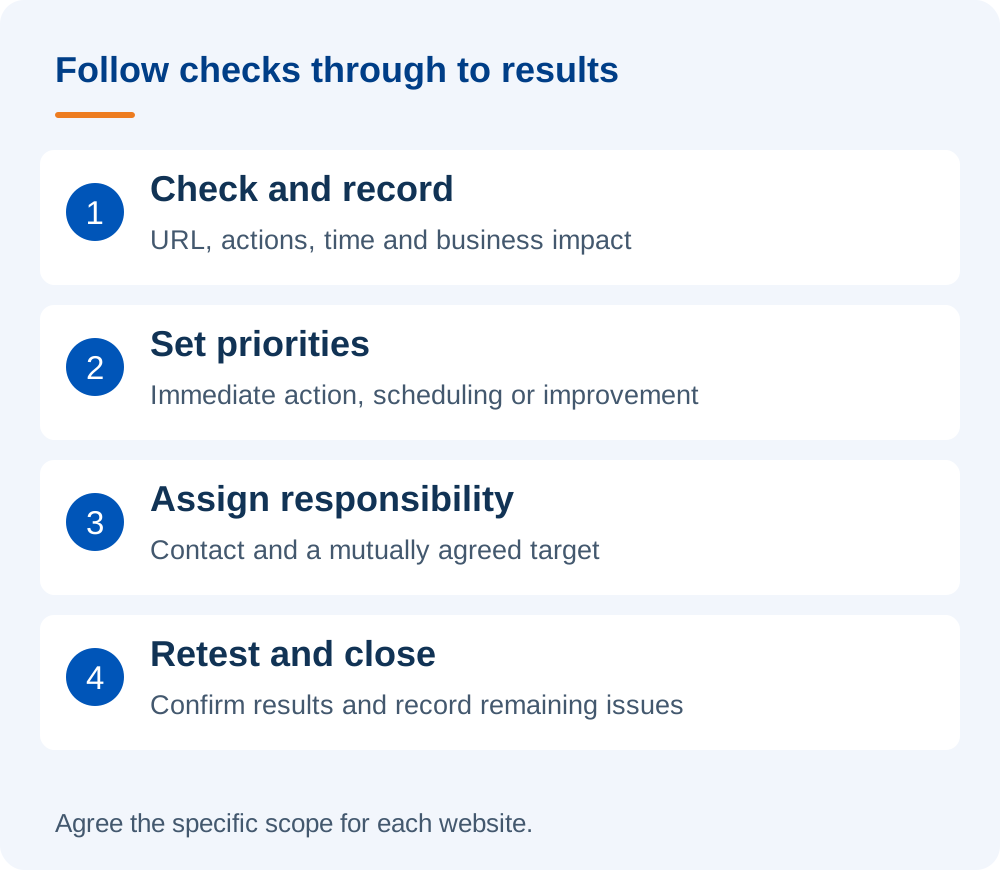
A tracking template to follow through after discovery
Copy this structure into your internal task tracker. Record each item as passed, faulty, not checked or not applicable.
| Item or URL | Result and issue | Person responsible | Agreed target | Retest date |
|---|---|---|---|---|
| Enter the page or function | Record status, symptoms, time and impact | Enter the contact who accepted the task | Enter after agreement by both sides | Record the outcome after the fix |
Hypothetical example: a consultation form displays success but Sales has not received the test enquiry. Record the time, submitted page, expected destination and person investigating. Close the task only after a successful retest and confirmation that the receiving team has the data.
When should checks happen outside the monthly schedule?
Add checks after software updates, interface changes, hosting moves, email-service changes or new integrations. Before a campaign, retest the exact landing page and flow customers will use.
For multilingual websites or separate mobile interfaces, test the relevant versions. On AMP websites, a page displaying on a phone does not replace AMP validation and checks of its corresponding form.
Who follows the work through to completion?
Each review should have a coordinator, even when several parties share the work. That person need not fix faults themselves, but should know who has each task, what is pending and whether it has been retested.
If many items lack an owner, discuss a suitable WordPress website maintenance scope with DigiWeb. Please send your website and priority issues to work out how to organise ongoing care, monitoring and improvements.